Windows and Mac
How to fax from a computer
There are three realistic ways to send a fax from a PC or Mac: through an online fax service in your browser, through Windows Fax and Scan with a modem and a phone line, or through an office multifunction printer that has a fax card. Here is what each one needs and when it makes sense.
Written by the FaxBolt team · last checked
Option 1 — an online fax service (no hardware)
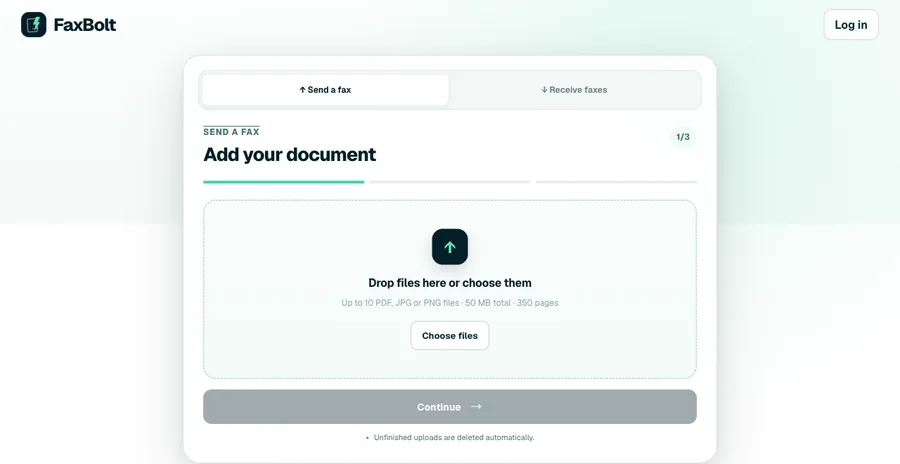
- Open faxbolt.com and click Send a fax.
- Drag your PDF, JPG or PNG into the upload area — up to 10 files, 350 pages or 50 MB per fax.
- Enter the recipient's fax number and add a cover sheet if they expect one.
- Check the summary, confirm your email and send. The status appears in your history as it goes out.
This works identically on Windows, macOS, Linux and ChromeOS, because the fax call happens on the service's side, not on your machine. It is also the only option that gives you a number for receiving replies without keeping equipment and a phone line running.
Option 2 — Windows Fax and Scan
Windows still ships a fax client. It is genuinely free, but it needs hardware most modern computers no longer have: an analogue fax modem and a landline that carries a dial tone.
- Connect a fax modem and plug an analogue phone line into it.
- Open Windows Fax and Scan and choose New Fax. On Windows 11 it is an optional feature rather than a preinstalled app: add it under Settings → System → Optional features → View features, search for "fax", and install Windows Fax and Scan. It is not available on Windows on ARM.
- The first run asks you to set up a fax account — pick "Connect to a fax modem".
- Fill in the recipient's number, attach or type your document, and send.
What Windows Fax and Scan cannot do
- Work over every VoIP line: it needs proper fax support (T.38, or G.711 pass-through with compression off) on both the provider and the adapter, and fails mid-page without it.
- Receive anything unless the computer stays on with the line connected.
- Save you money if you have to buy the hardware: a USB fax modem costs about as much as a couple of months of an online service.
Option 3 — a multifunction printer with a fax card
If your office already has an all-in-one with a fax line, the printer driver usually installs a "Fax" printer. Choose File → Print, select that fax device, and the driver asks for the destination number. This is convenient when the hardware exists; it is not worth buying and provisioning a phone line for.
On macOS the equivalent used to be the built-in "Fax PDF" option in the print dialog. Apple removed modem fax support years ago, so on a modern Mac the only routes are a network printer with a fax card or an online service.
Which one to choose
- Occasional faxes, no hardware: online fax service — nothing to buy, works from any computer.
- You already have a modem and a real analogue line: Windows Fax and Scan is free and fine.
- You are in an office with a fax-capable copier: print to the fax device, no new accounts needed.
- You also need to receive faxes: an online service is the only option that does not require dedicated hardware sitting powered on.
Preparing the document
- Export Word, Pages or Google Docs files to PDF first — conversion on the server can shift fonts and page breaks.
- Scan at 200–300 dpi in black and white. Higher resolution does not survive the fax transmission and only makes the file bigger.
- Open the PDF and check every page before uploading; the receiving machine prints exactly what you send.
- Put a page count including the cover sheet on the cover page so the recipient can spot a missing page.
Frequently asked questions
Can I fax from my computer without a phone line?
Yes, through an online fax service. The service holds the phone-line side and dials the recipient for you, so your computer only needs an internet connection.
Does Windows 11 have a built-in fax program?
Windows Fax and Scan still exists, but on Windows 11 it is an optional feature you add under Settings → System → Optional features → View features, and it is unavailable on Windows on ARM. It also needs a fax modem and an analogue phone line — it cannot send over the internet on its own.
How do I fax from a Mac?
macOS no longer supports modem faxing. Use an online fax service in the browser, or print to a network multifunction printer that has a fax card.
Can I fax over VoIP?
It depends on the provider. Fax tones are sensitive to compression and packet loss, so a VoIP line carries fax reliably only with T.38 or G.711 pass-through configured for it; without that, faxes drop mid-page. Ask the provider before relying on it, or use a service that faxes over dedicated infrastructure.
What does an online fax service cost?
FaxBolt is $4.99 for the first week, then $19.99 per month, with unlimited sending and receiving under fair use and cancellation online at any time.