Free tool
Fax cover sheet generator
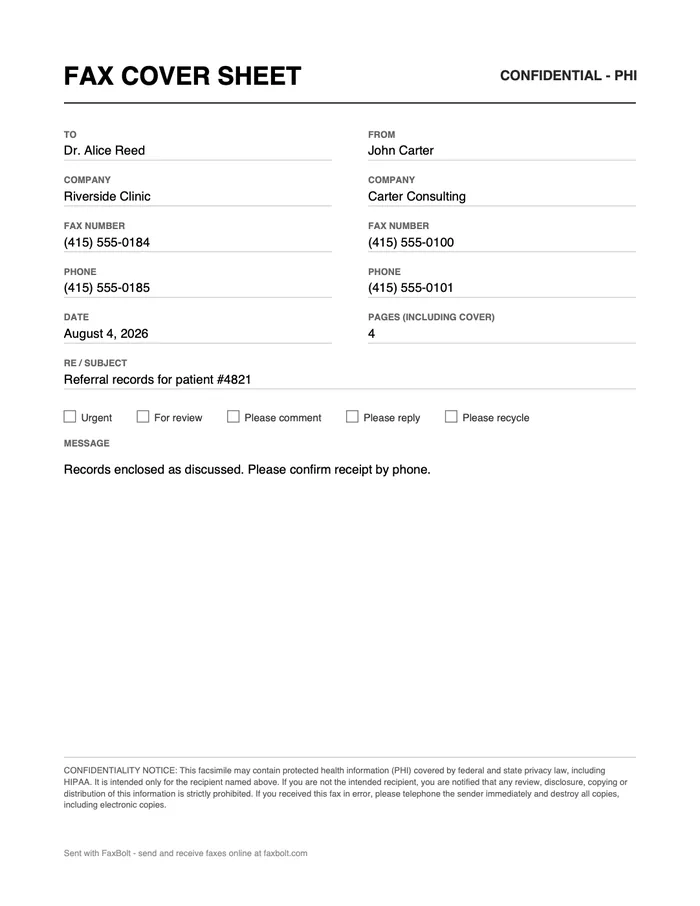
Pick a template — basic, business, confidential, urgent, medical/HIPAA, legal, personal or blank — fill in the fields, and download a finished fax cover sheet as a PDF or a Word file. It is free, there is no sign-up, and the file is built in your browser, so your document details are never uploaded to us.
Written by the FaxBolt team · last checked
1
CONFIDENTIALITY NOTICE: This facsimile and any documents with it are intended only for the person or entity named above and may contain confidential or privileged information. If you are not the intended recipient, any disclosure, copying, distribution or use of this information is prohibited. If you received this fax in error, please notify the sender by telephone and destroy all copies.
Sent with FaxBolt — send and receive faxes online at faxbolt.com
Which template to use
Every template produces the same clean layout; what changes is the notice at the bottom and the marking beside the heading. Switch between them at any time — what you have already typed stays.
- Basic — name, number, page count, no notice. For a fax to someone expecting it.
- Business — the standard confidentiality notice for company paperwork: invoices, orders, signed forms.
- Confidential — the same notice plus a CONFIDENTIAL marking beside the heading.
- Urgent — marks the sheet URGENT and ticks the Urgent box, for anything time-critical.
- Medical / HIPAA — protected health information wording and a CONFIDENTIAL - PHI marking for clinics, labs and billing offices.
- Legal — PRIVILEGED & CONFIDENTIAL for attorney-client material.
- Personal — no company lines needed, no notice; for faxing your own paperwork to an office.
- Blank — labels, ruled lines and the standard notice, with every value left empty to fill in with a pen.
What belongs on a fax cover sheet
A cover sheet is the first page a receiving machine prints. Its job is to tell whoever picks up the pages who the fax is for, who sent it, how many pages should have arrived, and what to do with it. Everything else is optional.
- Recipient name, and the company or department if the fax lands on a shared machine.
- Recipient fax number — so a misdial is obvious to whoever is holding the pages.
- Sender name, company, fax number and a phone number for questions.
- Date and the total page count including the cover sheet, so the recipient can tell if a page is missing.
- A short subject line ("Re:") and, if needed, two or three lines of message.
- A confidentiality notice when the fax carries medical, legal or financial records.
How to use the generator
- Enter the recipient's details on the left column and yours on the right.
- Set the date and the total page count — count the cover sheet itself as page one.
- Add a subject line and, optionally, a short message. Tick "Urgent" or "Please reply" if it helps.
- Choose a confidentiality notice: standard, a HIPAA/PHI wording for medical records, or none.
- Download the PDF (ready to send), download the .docx to edit in Word, or hit Print for a paper copy.
Prefer to fill it in by hand? Pick the Blank template and the download becomes an empty ruled form with the same labels.
Then send the fax without a machine
A cover sheet on its own does not send anything — you still need a fax line. With FaxBolt you upload the cover sheet PDF plus your document, type the recipient's fax number, and send from the browser. Delivery to US and Canadian numbers, up to 350 pages or 50 MB per fax, and you can prepare the whole fax and check the details before you pay.
Practical tips
- Fax machines print in black and white at low resolution — keep the sheet plain, avoid grey backgrounds and thin fonts.
- Write the page count as "including cover" so nobody argues about an off-by-one.
- Put a phone number on the sheet. When a fax half-arrives, the recipient needs a way to reach you that is not another fax.
- Never write account numbers, passwords or full card numbers on a cover sheet — it is the page most likely to sit on a shared tray.
- If you fax the same recipient often, download the .docx once and reuse it as your template.
Frequently asked questions
Which fax cover sheet template should I use?
Business for company paperwork, Medical / HIPAA when the fax carries health information, Legal for attorney-client material, Confidential or Urgent when you need the marking to be visible on the page, Basic or Personal when no notice is needed, and Blank when the sheet will be filled in by hand.
Is this fax cover sheet generator really free?
Yes. The generator is free and needs no account. It runs entirely in your browser, so the names, numbers and message you type are not sent to FaxBolt. You only pay if you also use FaxBolt to send the fax.
Do I need a cover sheet to send a fax?
Not technically — a fax will go through without one. But most offices, clinics and law firms expect it, because a shared fax machine gives no other way to route incoming pages to the right person or to notice that a page is missing.
How many pages should I put on the cover sheet?
The total number of pages the recipient should receive, counting the cover sheet as page one. If you are sending a three-page contract, write 4.
Can I edit the cover sheet in Word or Google Docs?
Yes. Download the .docx file and open it in Microsoft Word, or upload it to Google Drive and open it with Google Docs. Both keep the layout and let you change any wording.
Does the confidentiality notice make my fax HIPAA compliant?
No. The notice is standard wording that tells an unintended recipient to stop and call you; it is one small part of the safeguards HIPAA expects. Compliance depends on how your organisation handles and transmits the records, not on the text of the cover page.
Can I remove the FaxBolt line at the bottom?
Yes — untick "Keep the small FaxBolt line at the bottom" before you download. The rest of the sheet stays the same.