Online fax service
Send a fax online
Upload a document, type the recipient's fax number, and send — no fax machine, no phone line, no software to install. FaxBolt delivers to fax numbers across the US and Canada, and you can prepare the whole fax and check the details before you subscribe.
Written by the FaxBolt team · last checked
How to send a fax online
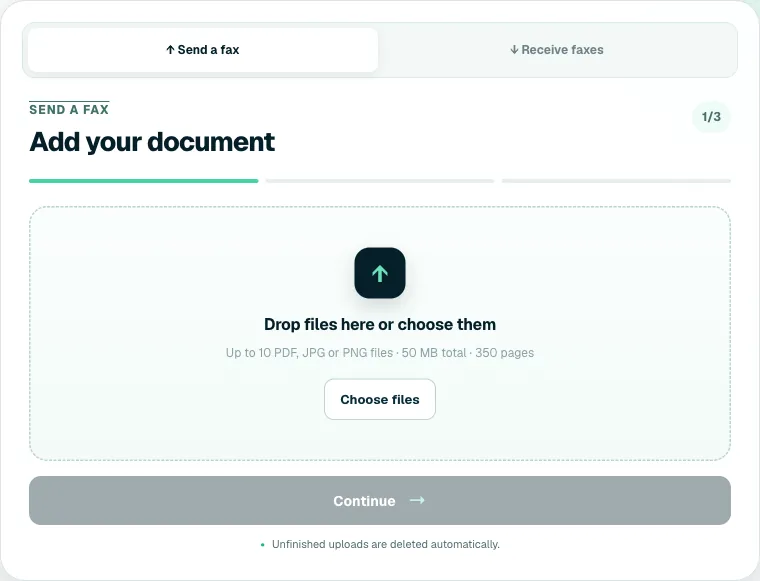
- Open the send page and upload your document — PDF, JPG or PNG. Up to 10 files, 350 pages or 50 MB in one fax.
- Type the recipient's fax number. US and Canadian numbers are entered as ten digits; FaxBolt formats them for you.
- Add a cover sheet if the recipient expects one. The free generator makes one in under a minute.
- Check the summary — the files in order, the page count and the destination number.
- Confirm your email, subscribe, and send. You will see the fax move through sending to delivered in your history.
Nothing is charged until you have prepared the fax and checked the details, so there are no surprises before you decide.
What you need — and what you do not
- You need: a browser, the document, and the recipient's fax number.
- You do not need a fax machine, a landline, a fax modem, or a driver.
- You do not need a fax number of your own to send. One is included if you also want to receive.
- You do not need to install anything — FaxBolt runs in the browser on a laptop, tablet or phone.
What it costs
$4.99 for the first week, then $19.99 per month. Sending and receiving are unlimited under a fair-use policy written for ordinary personal and small-business faxing — there is no per-page charge and no monthly page allowance to track. You can cancel online at any time from the billing portal.
Compare that with the alternatives: a dedicated fax line runs $15–40 a month before you send anything, and the corner print shop charges $1.50–2.50 for the first page and about a dollar for each page after it. Around six shop pages a month and the subscription already wins.
Delivery, confirmation and failures
A fax is a phone call between two machines, so delivery depends on the far end answering. FaxBolt dials, negotiates, and retries automatically when the line is busy, does not answer, or does not respond in time. Each fax in your history shows its final state — sent, sending or failed — and a fax that fails for another reason, such as the call dropping mid-transmission, is reported so you can resend it.
Most single-page faxes finish in well under a minute. Long documents take proportionally longer because every page is transmitted as an image over a voice call.
Free fax services, honestly
Free fax services are real and they work — for a page or two. Checked in August 2026: FaxZero sends up to five faxes a day of three pages plus a cover, to the US and Canada, with no account and FaxZero branding on the cover page. GotFreeFax allows two faxes a day of three pages each and states it adds no ads, watermarks or branding. Fax.Plus gives ten free pages once — a total, not a monthly allowance. Limits change, so check before you rely on them.
Receiving is where free runs out. GotFreeFax publishes a shared inbound number and is blunt about what that means: everyone sees the same list of incoming faxes, and it tells you not to use it for personal or sensitive documents. Free personal numbers do exist, but with strings — FaxBurner hands you one for 24 hours, others keep the number only while you keep using it. A number that is simply yours costs money on any network. Long documents are the other limit: three pages per fax means a twelve-page contract goes out as four separate transmissions, and on the tighter daily caps that spills across days.
FaxBolt is the other side of that trade: no daily cap, nothing added to your pages, and a number that receives. The free cover sheet generator puts one small FaxBolt line at the foot of the sheet it makes, and that line is a toggle you can switch off. You still prepare the whole fax before paying, so you can see what you are buying.
Frequently asked questions
Can I send a fax online for free?
Yes, within limits. FaxZero sends five faxes a day of three pages plus a cover, with its own branding on that cover page; GotFreeFax sends two a day of three pages and says it adds no branding; Fax.Plus gives ten pages once, not per month. Receiving free means either a shared public number, which GotFreeFax warns against using for anything sensitive, or a temporary personal one such as FaxBurner's 24-hour number. For regular faxing or a number that stays yours, a paid service is the practical choice.
Can I send a fax online without a fax machine?
Yes. An online fax service holds the phone-line side for you: you upload a document, it converts the pages to a fax image and dials the recipient's machine. Nothing physical is needed on your side.
Where can FaxBolt send faxes?
To fax numbers in the United States and Canada, including toll-free numbers. International destinations outside that area are not supported today.
What file types can I fax?
PDF, JPG and PNG. Up to 10 files per fax, 350 pages or 50 MB in total. Word documents and iPhone HEIC photos are not accepted directly — export them to PDF or JPG first, which also stops the layout shifting during conversion.
How do I know the fax arrived?
Each fax shows its status in your history — sending, sent or failed. A failure usually means the far end was busy, did not answer, or is a voice line rather than a fax line.
Is faxing online secure?
Your upload travels over an encrypted connection and your documents sit in private storage with no public address — opening one asks your signed-in account for a link that expires within minutes. The last leg is an ordinary phone call to the recipient's machine, which is a property of fax itself and applies to every provider.
Do I need a cover sheet?
Only if the recipient expects one, which most offices and clinics do. Use the free cover sheet generator and upload it as the first file.